

Responsible Gaming Hub Key Takeaways
The Responsible Gaming Hub is a centralized dashboard that puts five essential protection tools at your fingertips.
- The Responsible Gaming Hub consolidates multiple safeguards into a single dashboard for seamless control.
- Each tool—from deposit limits to reality checks—can be customized to match your personal comfort level.
- Using the dashboard regularly helps you maintain a healthy balance between entertainment and risk.
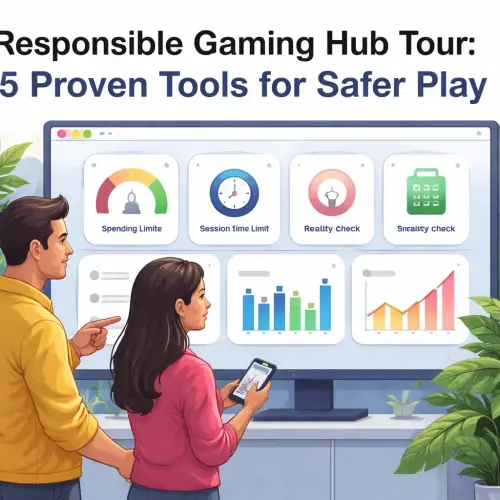
What Is the Responsible Gaming Hub and Why It Matters
Think of the Responsible Gaming Hub as your personal command center for safer play. Instead of hunting through multiple menus and settings, you get one dashboard where every major protection tool lives. It’s designed for players who want to enjoy gambling without losing control.
The hub addresses a common frustration: knowing that limits and checks exist, but not knowing how to set them up quickly. In a few clicks, you can tailor your experience to reduce impulse spending and monitor your play in real time. This isn’t about restricting fun—it’s about keeping the fun safe and sustainable.
Who Benefits Most from the Responsible Gaming Hub
Casual players who occasionally lose track of time benefit just as much as those managing a tighter budget. The hub removes friction from setting boundaries, so you’re more likely to use them. Whether you’re a seasoned gambler or a first-time player, having all tools in one place encourages proactive habit management.
How to Access and Navigate the Dashboard
Accessing the Responsible Gaming Hub usually starts from your account settings or a dedicated ‘Responsible Gaming’ section. Look for a shield icon, a ‘My Limits’ button, or a direct link in the main navigation menu. Once inside, you’ll see a clean layout with each tool displayed as a card or tile. For a related guide, see Close Gbet Account Temporarily or Permanently – 3 Safe Steps.
Most platforms group tools logically: financial limits under ‘Deposits,’ time management under ‘Play Sessions,’ and stronger interventions under ‘Self-Exclusion.’ Spend a few minutes exploring the dashboard before adjusting anything. Understanding the layout makes later customization faster. For a related guide, see 7 Smart Mistakes to Avoid When Playing on Gbet.
Step 1: Navigate to the Hub
Log into your account and click on your profile picture or username. Select ‘Responsible Gaming’ or ‘Account Limits’ from the dropdown. If you can’t find it, check the site footer or help center—many operators link there.
Step 2: Familiarize Yourself with the Interface
Take a look at each tile. Common labels include: ‘Deposit Limit,’ ‘Loss Limit,’ ‘Session Timer,’ ‘Reality Check,’ and ‘Self-Exclusion.’ Hover over or tap any tool to see a short description before activating it. This preview helps you avoid accidental changes.
5 Tools on the Responsible Gaming Hub Dashboard
Each tool serves a specific purpose. Below is a breakdown of what they do and how to set them up perfectly for your needs.
1. Deposit Limit Setup
This is the first line of defense. You choose a maximum amount you can deposit daily, weekly, or monthly. Once set, the system blocks any deposits beyond that limit, even if you try to override it.
How to customize: Click the ‘Deposit Limit’ tile. Select your preferred time frame (daily/weekly/monthly). Enter a realistic number based on your disposable income. Confirm with your password or two-factor authentication. Your deposit limit setup takes effect immediately.
Pro tip: Start with a lower limit than you think you need. You can always increase it later (usually after a 24-hour cooling-off period), but decreasing it takes effect at once.
2. Loss Limit Setup
A loss limit works like a deposit limit but focuses on net losses—the gap between what you stake and what you win back. It prevents you from chasing losses when a session goes south.
Set your cap for a session or over a week. This tool is especially helpful for table game players whose bets vary widely. Pair it with a deposit limit for double protection.
3. Reality Check Tool
If you’ve ever lost track of time while gambling, this tool is your lifeline. The reality check tool sends pop-up notifications at intervals you choose—every 15, 30, or 60 minutes, for instance. The message shows how long you’ve been playing and how much you’ve wagered or lost.
How to set it up: Open the ‘Reality Check’ card. Drag the slider to your preferred time interval. Confirm settings. During play, a discreet notification appears. You can choose to continue, take a break, or close the session.
Why it works: Many gambling operators are required by license conditions to offer reality checks. Using them reduces the risk of extended play sessions you didn’t intend.
4. Session Timer (Auto-Stop)
Similar to a reality check but more firm: once the timer runs out, the game automatically pauses or logs you out. You can’t override it without waiting for a cooling-off period.
Set the timer when you start a session. If you’re playing multiple games, the timer runs across all open tabs. This tool is ideal for night players who want a hard stop to get sleep.
5. Self-Exclusion Guide
Self-exclusion is the strongest protection tool. If you feel your gambling is causing harm, this option blocks your account—sometimes across multiple sites—for a set period. A self-exclusion guide within the hub explains the steps and consequences.
Steps to activate: Click ‘Self-Exclusion.’ Read the information page outlining what happens: your account is locked, any remaining balance is returned according to policy, and you won’t receive marketing. Choose a duration (e.g., 6 months, 1 year, 5 years). Confirm your identity. The change is immediate and cannot be reversed.
Important: If you self-exclude on one site, check if the operator participates in a national self-exclusion scheme (like GAMSTOP in the UK). That extends the block to partner sites for more robust protection.
| Tool | Primary Purpose | Adjustment Speed |
|---|---|---|
| Deposit Limit | Control money in | Instant reduction, delayed increase |
| Loss Limit | Cap net losses | Instant reduction, delayed increase |
| Reality Check | Time awareness | Instant on/off |
| Session Timer | Hard stop | Instant on/off |
| Self-Exclusion | Account block | Immediate, irreversible |
Best Practices for Using the Dashboard Effectively
Even the best responsible gaming tools are only useful if you integrate them into your routine. Here are practical habits that maximize the dashboard’s power.
Set Limits Before You Play, Not During
Adjusting a deposit limit while you’re in a game can lead to emotional decision-making. Instead, set all limits during a calm moment—first thing in the morning or when you’re not logged in. This ensures you choose numbers that reflect your long-term intentions, not a short-term urge.
Combine Multiple Tools for Layered Protection
Don’t rely on just one control. For example, combine a daily deposit limit with a 30-minute reality check. If you chase losses and hit the loss cap first, the session timer gives you a second prompt to stop.
Review Your Dashboard Weekly
Habits change. Take five minutes every Sunday to open the hub and see if your limits still feel right. Maybe you had a good week and can lower them further, or you need to tighten up after a few slips. Regular check-ins maintain the tool’s effectiveness.
Use Self-Exclusion Only When You Mean It
Self-exclusion is a serious step. If you feel tempted to exclude yourself on a whim to ‘take a break,’ consider using the session timer instead. Reserve self-exclusion for situations where you believe you’ve lost control and need a hard barrier to protect yourself.
Share the Dashboard with a Trusted Friend or Family Member
Some platforms allow you to grant view-only access to a partner or parent. This creates accountability and helps loved ones support you if you ever hesitate to use the tools yourself. It’s an optional feature but powerful for those managing problem gambling.
Useful Resources
For more on setting limits and understanding your play, explore these external guides:
- BegambleAware: Staying in Control – Practical advice on deposit limits, reality checks, and self-exclusion.
- GamCare: Tools and Support – Detailed walkthroughs of the gambling protection dashboard features available on major sites.
Frequently Asked Questions About Responsible Gaming Hub
How do I access the Responsible Gaming Hub?
Log into your account, navigate to settings or ‘My Account,’ and look for ‘Responsible Gaming’ or ‘Account Limits.’ The hub is usually one click away from your profile.
Can I change my deposit limit after setting it?
Yes. You can lower your deposit limit at any time and it takes effect immediately. Increasing the limit typically requires a 24-hour cooling-off period before the change applies.
Is the reality check tool available on all games?
Most licensed operators offer reality checks across slots, table games, and live casino. Check the responsible gaming section of each site for specifics.
What happens if I ignore a reality check notification?
The notification reappears at intervals. Some platforms automatically log you out after a set number of ignored checks. You can always dismiss it and continue playing.
Can I set different limits for different games?
Deposit and loss limits usually apply to your entire account, not per game. Session timers and reality checks run across all active games.
How do I know if the hub works on my mobile device?
Most major gambling sites have a mobile-responsive dashboard. Open your browser or app and follow the same account menu path. The interface adjusts to smaller screens.
Is self-exclusion reversible?
No. Once you self-exclude, the decision cannot be undone for the chosen duration. Some operators allow a short grace period (e.g., 24 hours) to reconsider, but after that the block is permanent.
Will self-exclusion affect other gambling sites?
Only if the operator participates in a national multi-site scheme like GAMSTOP in the UK or self-exclusion databases in other regulated markets. Check the site’s policy.
Can I use the hub if I’m not logged in?
No. The dashboard is account-specific and requires you to be logged in. Some sites show a preview of available tools on the help pages.
What is the difference between a loss limit and a deposit limit?
A deposit limit caps the money you can add to your account. A loss limit caps the net money you can lose (deposits minus withdrawals). Both can be used together.
How do I set a session timer?
Open the hub, click the ‘Session Timer’ card, choose a duration (e.g., 60 minutes), and confirm. The timer starts when you begin a game.
Does the session timer pause if I close the browser?
It depends on the platform. Some timers are server-side and continue running even if you close the tab. Others reset after a short inactivity period.
Can I set a reality check for every 10 minutes?
Most platforms allow intervals as low as 15 minutes. A handful offer 5- or 10-minute intervals. Check the settings within the hub.
What should I do if I can’t find the hub on the site?
Contact customer support or search the help center for ‘responsible gaming.’ If the site is licensed, it must provide access to these tools by law.
Are the tools free to use?
Yes. All responsible gaming tools are provided at no cost as part of the operator’s license obligations. You never pay to set a limit.
Can I use the hub if I’m on a self-exclusion period from another site?
Yes, but you cannot create a new account on that same site. The hub is only available for active accounts.
How do I delete or clear my limits after setting them?
Deposit and loss limits often cannot be deleted entirely, only reduced to zero. Session timers and reality checks can be turned off instantly from the hub.
What happens if I hit my loss limit mid-game?
The game usually stops immediately. You cannot place further bets until the limit resets (daily/weekly/monthly). Any remaining funds in your account stay available for withdrawal.
Does the hub track my play across multiple devices?
Yes, because limits are account-based. If you play on a desktop and then switch to mobile, the same limits apply.
Is my data safe within the hub?
Yes. Reputable operators encrypt all account data and do not share your responsible gaming settings with third parties without your consent.